
The G90 car DVR from Shenzen DOME Technology (aka BL950) is a new Full HD device based on the Ambarella chipset A7 and Omnivision sensor.
It doesn't go unnoticed in the Dash Cam community.

I knew that day would come...after the IP Cameras, the Android phones and tablets, now is the turn of some Car DVR to be reviewed here. I tried my best to resist their appeal and, frankly, it was not too hard... until recently.
Peace of mind but not at any price.It is now possible to find some Full HD models with a good balance of hardware and software quality for less than 90€ . The
G90 (aka
BL950) is one of them.
No GPS?During my early researches, having a GPS embedded was my obsession, but it occurred to me that most of the time this choice would be at the expense of the camera quality, unless you're ready to pay much more. Beside, while having a GPS log along with your video footage is super cool, I'm not sure it adds anything to the value of a video evidence (you can retrieve the exact location quite certainly from the video alone). I also agree with the opinion that having a speed log could sometimes play against you if you were driving 51 km/h in a 50 zone
.
No LED?
I have never seen LED as an advantage for any camera that should sit behind a window, but there are so many on the market that I'll try one of them for sure. Instead, this camera has a big F1.8 aperture with a 4 megapixels
OV4689 sensor and should see well enough in the dark.
No dual camera? Better with one good than 2 bad ones, I'd stick with a single camera device for now, but a 170 degree wide angle nevertheless, for the sake of simplicity.
Size and discretion are important factors to me as well and the G90 is just within the limits and uses no flashy colors that may attract attention.
Until recently Shenzen DOME Technology was producing dash cameras for other companies, but they now have their own brand, BlackView (aka Lingdu in Chinese), which explain the various names of the same device. It is also worth noting that the G90 could exist in several versions using different Ambarella chipsets (
A7LA30, A7LA50, A7LA70 reviewed here)
 First use
A leaflet in the box recommends the use of a
Class 10 microSD memory for best results, so that's what I did.

My camera came with the firmware version r3540M and the first thing I did was to check for an updated version. Fortunately Dome/BlackView is very active and present on the DashCamTalk.com forum and newer versions can be found
there.
The device feels solid and well assembled with a high quality six-glass lens.
Picture qualityThe A7 chipset complies with the legendary Ambarella quality tradition and it was obvious when tested simultaneously against the G55W, another full HD camera using a fairly unknown LD6188 chipset.
The unit reviewed is equipped with the A7LA70. While features and resolutions vary between A7LA30, A7LA50 and A7LA70 (differences explained here), all take their picture quality from the same Omnivision sensor.With the firmware tested here, the highest resolution available for the
A7LA70 was 1920x1080x30fps,
but 1920x1080x60fps 2560x1080@30fps, and 2304x1296@30fps have been added afterward.
In the sample pictures taken from video files below, the difference is clearly in favour of the G90, with sharper images and better light processing. The 170 degree view angle cover the front area perfectly.
 |
| G90 on a cloudy day, 1920x1080 w/HDR, Average meter mode, click for full size |
 |
| G55W comparison, click for full size |

The G90 behaves also very well at night time but I'm still figuring out the best settings (resolution, fps, meter, hdr, ...).
Some nice examples can be seen in
this post.
Blackview made some
night video samples available to download.
The 4 MP CMOS sensor capacity can be extrapolated to 16 MP which doesn't add to the quality and mainly results in a waste of storage space. The initial resolution is adequate for still pictures.
Sound quality:The camera came with the firmware version r3540M, which showed a terrible sound quality on the recording. This is a known issue, apparently confined to the first production batch, but my item is recent and still doesn't sound right. I updated the device with a recent version found on
Dashcamtalk.com.


The update operation is as simple as copying the "firmware.bin" file in the root of the memory card and turning on the camera. (The camera should be kept plugged to a USB power during the firmware update)
With the r328MP installed, the sound problem is still present but less severe: you have to reach a certain ambient sound level to notice some saturation.
However the indoor recording quality does not matter much to me, and this very sensitive microphone may come handy to record more important sounds
outside the car (like an argument with another driver following a accident...), so it's not all bad.
See this forum thread for details.
 Ease of installation and use
The suction pad mount of the G90 has a USB connector which makes the installation easier. The camera position on the bracket can be adjusted but is very stiff even with the screw completely released.
The menu interface and button layout are straightforward.
The Mode button goes from video recorder, to still camera, to Playback.

The orange button on the left is can be used for marking an event while driving so the footage around that time is write protected.
In still camera mode, it's the OK button that acts as the trigger.
The screen quality is average but bright enough in full day light. However reviewing videos on this device is limited by 2 problems:
1. There is no pause or fast forward control during the playback
2. The undersized 90mAh battery is just slightly better than a capacitor: Most of the time, you'll see "Battery Emtpy" a couple of minutes after unplugging the camera from power. However in rare cases where the battery could be fully charged with the device turned off (it never happens in real life), it could run for up to 20 minutes.
Amongst other ways of reviewing the footages (HDMI output, 3.5mm jack AV out), taking the memory to another device or plugging the USB to a PC is the best option. The free
Registrator Viewer is perfect to review the recordings.
 Legality. Size and position matter

In most EU countries there's hardly any specific regulation in place about dash cams. They are nevertheless affected by existing laws: privacy protection, windscreen obstruction by any object, use of video screens while driving, all these factors have to be considered.
What you do with the footage (producing evidences in court, publishing publicly) may also be subject to argument.

I tried to place the camera as close to the mirror as possible, but the dotted area on the windscreen gives a hard job to the suction pad. I will probably end up using a 3M sticky pad mount or better: a mirror clamp.

In some countries, it is forbidden to have any video screen playing while driving, the satnav being the only exception.
The G90 has a Backlight Off function. However it is worth noting that, up to the latest firmware version, this feature will stop working if the Motion Detection (also called Parking Mode in other models) is activated .
In conclusion: Priced around 90€, this camera has no bells and whistles, but simply the best chipset on the market coupled with serious 6-glass,
170° wide
angle optics. The G90 appears to be currently the best eye-witness in the vast jungle of dash cams.
To be perfect, It should have had a bigger battery and some aspects of the current software could be improved.
The G90 is widely available on
Dealextreme,
Gearbest,
ebay, but if you're in Europe and want to buy locally
JooVuu (based in UK) has it for a decent price (considering import taxes paid). It's worth mentioning that JooVuu is also the only one to specify the A7LA70 in the product specification. When it doesn't appear, you may receive the A7LA30 ("limited" to 1920x1080x30fps).

Good:- Great video and still picture quality day and night
- Very sensitive microphone
- Neat HDMI output quality (not the case of all dash cams)
- Responsive after sale service with great reactivity via the forums.
Not so good:- Very short battery life, would not exceed 2 minute in real life condition.
Room for improvement:- Backlight Off function not working with Motion Detection activated*
- Sound saturating in loud environment*
- No playback controls (FF, pause) on device*
* all these could be improved by mean of firmware update.
Dedicated sub-forum on DCT :
http://forum.dashcamtalk.com/forums/g90.80Feel free to email her for further information on that product.

 Since my first review of the Dome G90 , several generations have been released.
 The GS90-7S is priced around 85.99$ (~75€) at GearBest (with


 For a while, the dash cam community expressed wishes to see a more compact one with 3M sticker. This was never really a problem for me but now that we have a GPS module in addition to the power connector, it would be a good opportunity to update the bracket with both connectors on its base.
 The Mini-CD contains what is supposed to be the BlackVue player, but I could not run it. Anyway, nothing beats the Registrator Viewer.
 6.0.0.1 won't read the GPS track correctly, but 6.0.0.8 will.


 That noise can also be heard in other videos from on Dashcamtalk.
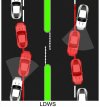 Lane Departure Warning System: in case you drift to the other lane

 The surrounding bells and whistles (driver assistance) are of arguable utility and so is the parking mode due to the short battery autonomy (which is "by design" since documented in the manual.)
 - Accurate GPS information


