Showing posts with label review. Show all posts

Dome D201, 1440P Dash Cam Review

Dome D201, 1440P Dash Cam Review
The D201 is the first car camera equipped with the Ambarella A12 chipset with a 5MP sensor (OV4689) allowing a video resolution up to 1440P (2560x1440@30fps).
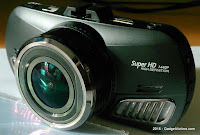


Ambarella A12 pushes the resolution limit to 1440P (A7 chipset was 1296P)


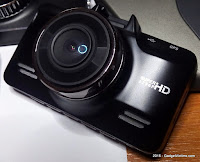
The unit is bigger than its predecessors (G90/G98S). Despite the size and the chrome vents (They're supposed to remind the grille of some cars.) the camera remains reasonably discrete.

The D201 is also produced in gold color. Gearbest made the wise decision to sell the black version.

The tiny 190mAh battery can keep the camera powered for about 15 minutes, comparable to the GS98C. This gives enough autonomy to take some pictures outside the car.

The power button located on the top right side doubles conveniently as camera button...well done Dome!

The suction mount is basic and not the easiest to fit the camera on.
For the price (139$/124€ @ Gearbest with the GPS unit.), Dome could have included a better base where power and GPS would be connected permanently.

User Interface:
The buttons are clearly labelled and positioned on the left and right edges of the camera. This is ok except for the only button, "SOS", that won't be easy to reach while driving. There is a bigger chance to accidentally rotate the camera than with a button on the back side (as with G90) where you just need to "pinch" the camera.

The setting options are limited to the strict minimum:
There's (again) no option to get rid of the permanent speed indicator, it is also restricted to km/h, there's no  picture tuning (EV, white balance, metering...) and no ADAS calibration.

The G90 and its "easy to pinch" SOS button


GPS: The GPS module works as expected and, if well positioned, takes about a minute to lock. It's not the fastest (within 15" for Ausdom A261) and not the slowest (~4 mins for CDV300X).

Video player...

For once, the Registrator Viewer is not the best choice because it does not recognize the GPS track format unfortunately.
The internal storage of the camera contains a video player (Player_installer_v1.114.exe)
At first, it looks like it only reads mov files (and this camera produces mp4's).
This is just an omission in the File Type selector. The trick is to type * in the File Name field to display the MP4 files.

Once loaded, the video can be played with most GPS track information.


Video and audio
The sharpness improvement brought by the 1440P resolution is visible when looking at the details, like registrations of cars passing by. In the example below (a foggy November morning), I'm driving at 77 km/h and the Ford is approaching at about the same speed. Here you can more than guess the "5454" which would be too blurred to read in any lower resolution.


The permanent speed stamp: more than a bug! A Dome tradition!
It is worth mentioning that the audio is excellent and clean from any interference.
Beside the optional stamps for Car ID, Date and Time, the Speed Stamp is there too.


The 2.7" LCD screen is really just good enough to configure the device. The low screen resolution and lack of pause or volume function makes it inconvenient for video playback.


Conclusion:
The D201 is a fine container to show off the new Ambarella A12 chipset with 1440P videos.
D201 and GS98C
The increase in resolution makes a difference when it comes to review the details in a recording.
The overall product design is good and the software is ok although more options would have been nice.
Like GS98C, the D201 offers a clean sound quality and an adequate battery strength, two of Dome biggest problems in the past.

The initial price tag (139$/124€ by Gearbest) is a big high, more than twice the cost of the 1296P-capable GS98C (also with GPS).
The coupon "D201", however, brings the price down to a more reasonable $105.99/99€
Also, the D201 will be available for a limited time at 95.99$/90€ during Gearbest 11/11 promotion.


Pro:
- Sharp and smooth 1440P videos
- Clear and loud audio recording
- Battery, once charged, would power the camera for about 10 minutes
- All sounds including jingles can be muted
- Video Player reads the mp4 files once you know how to load them.

Cons:
- Permanent speed stamp on screen, once again, including on still pictures.
- Slightly bulkier than its predecessors
- Limited configuration options


Special thanks to Lindell @ GearBest for providing this sample.
Read More

Ausdom A261 UHD Dash Cam review

Ausdom A261 UHD Dash Cam review
The Ausdom A261 is a complete dash cam product based on the famous A7LA50/OV4689 winning team and a built-in GPS.


Highlights:
Video Resolution :
2304x1296 30P 16:9 / 2560x1080 30P 21:9 1920x1080 45P 21:9 / 1920X1080 30P 16:9 HDR 1920X1080 30P 16:9 / 1280X720 60P 16:9; 1280X720 30P 16:9
Image Resolution : 4M (2688×1512)
F/2.0 6G heat resistant lens, 130 degree view angle
Support auto power on / off
Support night vision / motion dection / loop recording / G-sensor
Support up to 64GB microSD (tested and works)
2 inch TFT screen
Chipset: Ambarella A7LA50
Sensor: OV4689
Battery: 250mAh, rechargeable
Mounting: Suction cup with T-slot fixing
LDWS/FCWS, Parking mode

83.99$/75€ at Gearbest.com

Unpacking and product design:
Unlike Dome with their huge range of models and variants, Ausdom focuses on a selection of models but with special care to the details.

The neat packaging announces already something superior.
It contains the A261 unit,  1 Car Charger, 1 Mount Bracket, 1 USB Cable, 1 Power Cable, and the User Manual.

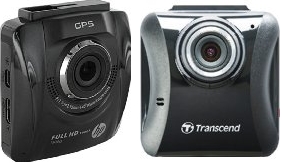
The camera compares in shape with a HP F500G or Transcend Drive Pro 220 and the only thing cheaper here is the price.

On one side is the power button and the MicroSD card slot, on the other, a Mini-HDMI, a micro-USB connector and a reset button. The back side has a 2"/5cm TFT screen with 4 buttons.
The UP button also allows to mute the microphone or to switch to the HDR mode resolution (long press) and the DOWN button doubles as a SOS button (to write-protect the current recording segment). The available functions are clearly displayed on screen above each button.

The T-slot on the top makes it easy to attach and remove from the suction cup bracket.


Firmware: CAR DV 50 ARAK150718A
All the functions provided by the Ambarella chipset are available from the menu. The interface supports English and Russian only.
While the "beep sound" can be muted in the settings, the loud Ambarella jingles can't, and there's no volume setting available.


GPS:
An embedded GPS can be a challenge for some manufacturers, but Ausdom did a great job. The A261 gets the fix in a matter of seconds (less than 15). For instance, the CDV300X -also with embedded GPS- needs up to 4 minutes. The time setup needs however to be visited to specify the right time zone.


Battery life:
250mAh battery gives an appropriate autonomy to the camera so it can be used outside the car. Unlike other models tested that turn off due to empty battery shortly after being disconnected, this one gives about 8 minutes of recording time and 15 in standby on paper. I actually got 25 minutes of mixed use with motion detection activated.
The 4mpix sensor takes good snapshots but unlike the video, is not dewarped.

A real user manual:
The user manual is above average and deserves to be mentioned. The 9 pages cover many points that others don't bother explaining, like how to properly calibrate the LDWS/FCWS.
In addition to English, there are translations French Russian German Spanish and Italian.

Audio and Video Quality:
Coupled with the Ambarella A7LA50 chipset, the 4 Mpix OV4689 sensor supports LDWS, HDR and Dewarping.
The audio quality is excellent with no interference. The microphone proved to be sensitive enough to catch clearly a conversation from outside the car with the engine running.


Video player:
The mini-CD provided contains a "GPS Player" software for Windows. It is quite basic and very slow at loading the videos. FHD files would eventually play but any UHD file will crash the player.


The popular Registrator Viewer, as always, is a preferable alternative, but it has a strange bug, translating the speed from this camera as twice the actual value.

Ausdom encodes the GPS data in movLogDVR format (most others makes use movMap800 or movDOD_D) which is stored in a displayable subtitle track. This allows to see right values with VLC or MPC and confirms that the camera is not in cause.
Workaround: Export and re-attach the GPS track. It will then display the right speed.


Conclusion: The Ausdom A261 succeeds where many others fail.
I've been reviewing a lot of dash cams lately and this Ausdom camera is a refreshing change.
It demonstrate how good a car camera can be when it's designed the right way.

The A261 is a high quality product in every aspect: packaging, camera, accessories, and documentation. Their other products are highly rated in the user reviews so this dash cam is in line with the company's quality standards.

For me, the dream dash cam would be this A261 in the wedge shape adopted by A118 and CDV300X, but otherwise I can fault it on any point.

The Ausdom A261 is highly recommandable and competitively priced at 83.99$/~75€ at Gearbest.com

Good:
- A7LA50/OV4689 for high quality UHD picture
- Good audio recording quality and sensitive microphone
- Fast and accurate embedded GPS
- Clear and complete documentation
- Great design, interface easy to use with direct access to the most used functions.
- Nice looking/quality feeling for both packaging and product
- Battery life gives up to 25 minutes of use.

Not so good:
- "GPSPlayer" software provided is useless, prefer Registrator Viewer. 
- No audio volume setting
- Ambarella jingles cannot be muted

More information:
Product page
Ausdom forum
User manual

Look-alikes:
Transcend Drive Pro 220 (FHD+GPS+WiFi)
Garmin 20HD (FHD+GPS)
HP F500G (FHD+GPS)


Special thanks to Lindell @ GearBest for providing this sample.

Read More

Dome GS98C Dash Cam Review

Dome GS98C Dash Cam Review

The Dome GS98C is a close cousin of the GS90C (aka G90-7S)

Each new model from Dome brings hopes for improvement over the previous ones...so let's see.


Product Highlights:
Ambarella A7LA70 (2304*1296@30fps, 2560 x 1080P@30fps/1920 x 1080P@60fps/1920 x 1080P@30fps/ HDR 1920 x 1080P@30fps/1280 x 720P@60fps/1280 x 720P@30fps) 
178 degree view angle, f1.8, 6G glass lens
2.7in LCD screen
Video Format: MPEG-4, H.264 compression
Audio: AAC (mp4a)
HDR
ADAS system
AV-OUT, HDMI
Battery: 190mAh.
The box contains 1 x Camcorder, 1 x USB Cable, 1 x Car Charger, 1 x Suction Cup Mount, 1 x User Manual


Except for the FullHD stamp on the front, the look is very similar to the G90. It is in fact a G90 inside as the firmware, G90-ZX-A770-1424-S7H confirms, and that's ok.

It is therefore on par with the GS90C features (reviewed with G90-ZX-A770-785-S-H). In both cases, the S in the model means it has GPS.

Navigating the setup options is easy thanks to the functions printed on the back side of the camera. This seems obvious, but this is far more convenient than having functions engraved on the buttons as seen in other Dome products.

So, expectedly,  there are many similarities, and the persistent km/h recorded on video is unfortunately one of them. This is a long lasting and widespread bug in the Dome firmware (G90-7S, G5WA,...).

There are a few noticeable changes though:
- A working version of the Blackview player 1.109 is now included in the internal camera storage.
The GS90C player that came on a mini-cd was not working. This one now is decent, while not as good as the Registrator Viewer.


Mounting bracket: It turns out to be different from the initial design, where the GPS module was part of the mounting bracket. A hardware problem forced Dome to replace it with a less cool but at least working solution: a classic standalone GPS mouse.
The actual solution

The intended design

I found it the mounting bracket itself quite flimsy and being a step back from to the G90 series. An ideal mount would have gathered the connections for the GPS and power.


The GPS mouse provided needs over a minute to pick the position but works fine most of the time.
I had an isolated incident where the GPS got hung with a 780km/h speed until I power-cycled it.

Whenever I drive at 780 km/h, I don't want to see it recorded in the video.

Sound quality: The background noise that was polluting the video recording in G90, G90-7S, GS95A and G5WA is gone now, as shown in the short video sample below.


Battery: The battery gives about 15min from full charge, not great but at least the camera can be used unplugged for a short time. I gave it a full charge on an USB charger before using and maybe that's why I didn't get any loss of the time and date unlike reported by some users?
If there's a slight improvement from the G90, which hardly ever recharged the battery under normal use, this one seems to achieve that, so a short parking mode session could even be thinkable.

Conclusion:
For 66€/74$ from Gearbest.com. (Coupon: GBGS98C), the GS98C is a worthy successor for the G90 series, retaining all its qualities in a nice and discrete design, while fixing some but not all of its flaws. It is an improvement over the G90, even if everything is not perfect. 

Good:
- Nice design with convenient buttons layout
- No more interference from power adapter
- GPS
- Renowned A7LA70

Not so good:
- Speed is recorded on screen and not removable (bug common to all the Dome GPS models)
- Flimsy suction cup mount
- GPS not included on the mount as initially designed


FAQ and download:
http://www.szdome.com/service-faq.html

Product details:
http://www.szdome.com/product-detail-175.html

Forum (main thread):
Dashcamtalk #1


Special thanks to Lindell @ GearBest for providing this sample.
Read More

Ulefone Be Touch 2 review

Ulefone Be Touch 2 review
I pre-ordered the Be Touch 2 in June ago and it eventually arrived 2 months later!
Now I can't wait to smash nuts with the screen and pour soda on it like they do in their promotional videos!


I wanted to replace the Elephone P3000S-64 quickly and didn't listen to my own advice:
Never buy on pre-sale! 
It does not guarantee the lower price, you don't get it faster, and you're first in line to discover whether the device meets the announced specification.

By the time the Ulefone Be Touch 2 arrived from Geekbuying, it was available roughly at the same or lower price (~250$/220€) everywhere.

Highlight:
MTK6752 Octa Core 64Bit 1.7 GHz  with ARM Mali-T760 GPU
Android 5.1 (According to Ulefone, read further)
3GB Ram / 16GB Rom
5.5" 1920 * 1080 Pixel FHD IPS Screen with Corning Gorilla Glass 3.
13.0MP Back Camera (Sony IMX214 sensor) w/flash
5.0MP Front Camera (OV5648) w/flash
4G LTE, OTG, WIFI, GPS/GLONASS, Bluetooth, 
Touch Fingerprint scanner
Dual SIM and Micro SD card slot
Battery: Sony 3050mAh Lithium-ion Polymer 
Dimensions: 77.4 mm x 158.1 mm x 8.4 mm
Weight: 170 gr

Like the THL 2015 and Elephone P3000S-64 seen previously, the Be Touch 2 is based on MT6752.
The build quality is similar to the THL 2015 with a sober and clean design.

The specification of the Be Touch 2 has been subject to discussion on the forum lately so lets take a look at each of them:

Android 5.1...???
...they all have to lie about something it seems...

The "About Phone" screen proudly shows 5.1 as the Android version, but any good system information app (CPU X, Hardware Info, ...) will also return the build ID, which is here LRX21M
... which means 5.0.0_r2!
That alone can explain the Wi-Fi, battery and other issues experienced by some users.

Bad point, unless they eventually provide an update to the real Android 5.1. Ulefone claim they keep working on further updates.

3050mAh battery ?
While Ulefone didn't try to object on the fake Android version, they actually reacted quickly to the rumours about the fake capacity with a battery test video.

I personally get the phone going for a full day (Battery Monitor Widget report an average of just 12h) with mixed use, not intensive, but Wi-Fi always on, phone calls, in-car music via BT  and occasional GPS use. This varies widely of course with each other usage and energy saving strategy.


Various options in Android allow to keep the energy use under control. Disabling the useless background push services via the Auto-start management can help. Also, a power hog feature like "off-screen gestures" should only be activated if really used. Ulefone recommended to calibrate the battery which I didn't.

The most interesting discussion on this topic is found here.

Quick charge: full charge in just over 1 hour. I'm fine with that. Really that's a nice difference with my previous phones.

Performance:
I only tested the phone with the latest ROM received via OTA (Ulefone_be_touch 2_20150811).
The Antutu score is close to 45000 (Geekbench: 800/4022) which is respectable for a MT6752 with Mali T760. Lower scores have been seen by other users and maybe it was with a older release.
Also, no overheating while gaming, the phone may become warmer, not hot, which is common. The animations don't feel always smooth despite high FPS.


Fingerprint Scanner:
No longer a gadget, it works fast and well: just touch the button, no more swipe!
I usually prefer the face unlock which is missing from this release, but the fingerprint is an even faster way to unlock the phone, just press the centre button to wake up the phone, and leave the finger on it: it unlocks instantly. Neat!


Wi-Fi:
Another area of argument where Android 5.0 has its share of responsibility. However, I didn't have any problem connecting to my usual access points and the range was also slightly better than with the non-Lollipop Elephone P3000S-64 and THL 2015. Again I started with the OTA from 0811 which improves things in that area.

Screen quality:
 Backlight from P3000S and THL 2015
The 5.5  inch FHD screen is just as beautiful as the smaller THL 2015, with nice saturated colours and no backlight-bleeding issue like the P3000S.

Auto-brightness has been replaced with Adaptive Brightness in Lollipop.
The difference is that the display brightness will only slightly vary above or below the manually pre-set brightness level.

Tempered glass protection: I received 3 of them! (1 as part of the promotional sale, 1 as apology for delay from the shop, 1 more as apology for delay from Ulefone) So I felt I might as well try one. Ulefone advertise this as a way to push the date we'd go completely blind because of the blue light emitted by all those LED screens we use everyday. While I didn't find its oleophobic property really convincing, the filter offers an excellent readability and better feeling on touch than the tradtional plastic filters.

Sound quality:
For sure, the tiny speaker is not a Hi-Fi boombox, the sound is just about loud enough once the BesLoudness from Sound enhancement is enabled. It does the job though on the phone call department, and there's no complaint from either side of the call.

Music listening only makes sense through (Lossless) BT mode or with proper headphones anyway, and in that context, the Be Touch 2 does a good job.

Camera(s):
Back: Sony IMX 214, F1.8, 13MP.
The software part does not do justice to the excellent sensor. It is clearly not optimized and the results are frustrating, in particular once you've seen what that IMX214 sensor (and the previous IMX135) could do under KitKat. Instead, here we get very noisy low light pictures, and a lazy auto-focus that struggles on close-up's. The IMX214 can do 4K video recording but the option is just not there, the slow-motion videos can be recorded but fails to playback.


Achieving good pictures require several shots as, most of the time, the camera tends to go off focus just when taking a shot that looked great on screen he second before. So much for the WYSIWYG!

click on any picture for full resolution


Front: OV5648, 5MP, no autofocus.
The Omnivision sensor is in charge of the selfies with also a flash but no autofocus. It's nowhere near the IMX sensor in any way but does what it's there for.

NFC: No NFC but Mediatek's HotKnot instead. I have no other equipped device to try this tap-and-share technology. According to Mediatek, "it can do everything NFC does", ...obviously only between two LCD screens, so it won't match the wider field of application given by the NFC tags, for instance, and I don't see wireless payments, access control or Bluetooth pairing possible either.

GPS/Glonass and Compass: 
First, find a quiet and empty room, where you can do your compass-calibration dance in peace: this is definitely needed but once done, the compass is accurate.
The GPS gets the lock in a matter of seconds, even indoor. This is normal for the MediaTek 6752, but I still remember how pathetic it with their Quad-core range.

Hall sensor is present but not supported yet by the ROM provided
Conclusion: Unachieved potential...
I still need to get use to the size of that phablet, but for most of it, it turns out to be a nice looking, and pleasant to use.

Maybe receiving it so late was my luck?
It is possible that the the early batch had issues that have been fixed since.

The Be Touch 2 is a well designed phone, maybe a bit too basic: no backlight for the soft buttons and not notification LED (I would have traded the front flash for that one instead).

Along with the phone specification, the communication efforts from Ulefone was part of my decision to buy from them. However, just like their competitor, Elephone, they tricked their customers about the real specification (version of Android in this case). Let's hope they really intend to release a true 5.1. Ulefone so far indicated in every update notice that there was more to come. I suspect Mediatek to be partially responsible for the unachieved potential of this phone.

Without a proper software implementation, and a working proximity sensor in particular, it is difficult to recommend this phone. However if they fix the software issues very soon, it might become a good deal. From my experience, it is always risky to bet on promises for future development.
Sooner than later, all their efforts will be diverted to the next flagship which is always around the corner. I really wish Ulefone will prove me wrong just this time!


Good:
- fast and effective fingerprint scanner!
- stable phone despite its unfinished version of Android
(avoid the update 20151012 at all cost!)
- great FHD screen quality, bright and colourful
- comfortable 3GB RAM and good performance overall

Not so good:
- Fake Android version. It's really 5.0 not 5.1!
- No backlight for the soft buttons
- No notification LED
- Unfinished software implementation (Lazy camera autofocus, slow-motion video playback not working, Hall sensor not operational, battery can act weird for some, ...)
Added on 7/10/2015:
- Proximity Sensor stops working, see workaround.

Product page, xda forum, Ulefone on FB and G+


Read More