Showing posts with label update. Show all posts

Ulefone: Be Touch 2 a failure? Be Touch 3 is there!

Ulefone: Be Touch 2 a failure? Be Touch 3 is there!

Unfortunate owners of Be Touch 2 rejoice! Be Touch 3 is about to hit the market (translate: you're history)!


Owners of a Be Touch (#1) and Be Touch 2 who are still hanging on Ulefone promises to fix everything soon will be happy to discover yet another release: 
The Be Touch 3! (Tadaaaaa!)
uForget, but customers won't!

It seems that a new Be Touch model is released every quarter as a response to the users complains about their phone. Of course, the phone seems to work flawlessly as a hammer or as a nut cracker. Using it as a phone is another story.


Ulefone failed so far to update the Be Touch 2 to Android 5.1, and despite being still advertised as such, it comes only with a 5.0 (Build ID LRX21Mmasqueraded as 5.1! 

After announcing MIUI and Cyanogenmod ROMs for soon (back in July 2015) , they eventually produced a minor update as a way to calm the users. Unfortunately that turned into a major disaster for those who jumped on it. Not only failing to fix bugs with the proximity sensor and implementing the Hall sensor functionality, that OTA release reportedly broke further basic phone functions.

To some extend Ulefone blames Mediatek for not providing the proper drivers on time for release, but why have other MT6752 devices like iOcean Rock been updated fine 6 months ago?

Yet, Ulefone advertises Be Touch 3 with Android 5.1 (let's hope it's true this time), now with a slightly cheaper MT6753. 
If this new release is only about a different chipset, it sounds like some major road blocks with the MT6752 forced Ulefone to drop the curtain on it for good. 

...to be continued

Read More

Ulefone Be Touch 2: October OTA Disaster

Ulefone Be Touch 2: October OTA Disaster
The latest update  20151012 for Ulefone Be Touch 2 seems to bring more problem than it resolves.
It is intended to add only a few gimmicks and no real improvement, but in fact, the changelog is much bigger than expected...


The official 20151012 update changelog for Ulefone Be Touch 2 is as follow:
1. Improve battery life by optimizing battery consumption and indication.
2. Lift max volume in earpiece.
3. Add U-launcher which can be applied under “Home” settings.
4. Add U-browser.
5. Delete Ulefone website and facebook page from app drawer.

Small Update...Big Disaster!

However, once the 39.11MB file is installed, more changes are observed:
1. Wi-Fi turns off with screen regardless of the "Keep Wi-Fi on during sleep" option.
2. Continuous ring on incoming calls, requires battery removal,
3. Difficulty to answer incoming calls
4. Mixed reports on finger scanner improvement
5. Apps launch automatically after their installation
6. Antivirus scan may reveal a banker trojan in U-browser.

What was really expected and did not change:
1. Still no real Android 5.1, in reality it is 5.0.0_r2! (build ID is LRX21M)
2. Proximity sensor still stops working randomly
3. Proximity sensor calibration problem (temporary workaround here)
4. No significant improvement to the battery life.
5. Slow-motion video playback still not working.
6. Hall sensor still not operational.
7. Stagefright vulnerability

After taking the "smart" out of smartphone, this update, to some extend, the device doesn't even qualify as a phone either (as it does not behave normally on voice calls)

Obviously this update was rushed (although it took almost 5 months to get there!!) to reassure the increasingly angry  "Be Touch 2" customers who rightly feel they've been forgotten already with the Paris being all the rage for Ulefone!

My humble advice...skip this update! Wait for a real one (if ever)!


Read More

Firmware v6.0 for "MayGion" H.264

Firmware v6.0 for "MayGion" H.264
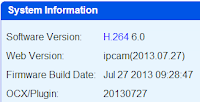
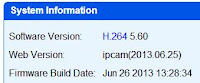
The latest firmware from Maygion brings various improvements and a special attention to non-IE users.


 The changelog for the v.6.0 update from Maygion is as follow:

  • Full support Chrome/Firefox on Windows,have full functions as in IE browser
  • Improved ocx.please update both app.bin&www.bin,then download ocx and reinstall
  • Add VOD for sd record files.
  • Add support for noip.com ddns
  • Add DST(daylight save time) option for NTP
  • Adjust video bitrate according to fps,lower fps will get small bitstream(with lower video quality)
  • Show RAM and flash space in system info page
  • Improved http server
  • Small improvement for IPCamTool.exe


  •  The main change is the integration of all the controls normally reserved to Internet Explorer into Chrome and  Firefox via the Windows Media PLayer Extension for HTML5.

    The OCX has also been updated and needs to be re-installed.
    Read More

    "Invalid License File" message after a firmware update

    "Invalid License File" message after a firmware update
    Several users of the Dericam H502W (Cybernova WIP604MW, and equivalent...) have reported the appearance of an "Invalid License File" warning in their System Information page after a firmware update.
    While the exact cause is still undetermined, some precaution should be taken before applying a new firmware.

    Prior to any change to the firmware of your H.264 IP Camera, you should  make a backup of its board.dat file, which can be extracted by visiting your IP Camera with the url: http://<youIPCurl>/board.dat
    This constitutes your license file in case you end up with a Invalid License File warning. It could then be re-installed via the auth.htm page (you should take a snapshot of your own page also, while all is ok). Only the manufacturer can provide a new valid license file. The board.dat is unique to each device so it won't help to upload one from someone else!


    The Dericam, Cybernova and other Maygion-based H.264 IP Cameras are assigned with a unique Hardware Identification (HID), a User ID (for the newer ones, adding P2P support) and a free DDNS ID (all visible in that auth.htm page mentionned above).
    Apparently, a compound of this data is challenged against the encrypted board.dat file, and any mismatch results in an invalid license situation.
    In theory all this information burned-in the camera at factory should not be affected by firmware upgrade and not easy to damage even through FTP access, but several cases have been reported already, all following update from very official firmware. 

    This situation is known to cause the following problems:
    - It prevents the IPC to use the P2P function
    - It makes the IPC reboot at interval of 10 minutes (cs.log file in /app would show [reboot for invalid auth file])

    Why this?
    The cause is not clear but I suspect the older production of this IP Camera to be particularly affected once they get updated with a certain firmware version. The introduction of P2P maybe changed the way the license file is validated. I'll update this section if I ever get more information.

    Read More

    Firmware v5.53 for "MayGion" H.264 (Dericam, Cybernova, ...)

    Firmware v5.53 for "MayGion" H.264 (Dericam, Cybernova, ...)
    For once, this update was not published by Cybernova but directly posted on MayGion web site.
    It brings further improvements to the ONVIF compatibility with special attention to Synology DSM 4.2.


    Important Notice: 
    Before performing any firmware update, read this post to learn about potential problems that can result from this operation as well as how to backup the board.dat file. 

    This update, published directly on MayGion web site, allowed me to use the camera with Surveillance Station 6 for the first time. There's no Pan and Tilt control yet, but hopefully this will come later.

    The mkbin tool is included in the package:
    This tool was in fact made available by Maygion in 2010 and allows to unpack the bin file, and to pack customized ones.

    Just drag and drop a bin file to the mkbin app to unpack. These extracted files are those that typically can be  uploaded via FTP to their corresponding www or app folders.


    I take this opportunity to praise the great investigation work done by macmpi on the hardware.fr forum!
    If you don't read French, please use a page translator like the one included with Chrome and read the second post on that thread to know more about the customization potential of this camera. It's worth reading, ...and it's only the tip of the iceberg...!


    Read More

    ES File Explorer 3.0

    ES File Explorer 3.0
    If you updated your apps lately, you may have noticed that ES File Explorer icon changed. Version 3.0 is out and the most remarkable changes are not always the most visible...


    Good surprise yesterday when I noticed that ES File Explorer 3.0 was finally out. The best File Manager for Android got even better!
    With its brand new user interface, it is even more intuitive than before. 
    A long press will now bring up four action corners (Share/Copy/WiFi Send-by-LAN/Delete/) to which the file can be dropped. The same drag'n drop method works on folders of course. 

    It is very usable and file list is even more readable on my tiny 3.6" phone screen (thanks to the "Small Detail" view). 


    The biggest addition for me is a feature that I suggested to EStrong some time ago: being able to copy the full path of a file to the keyboard.
    It seems small, but none of the FTP apps I tried so far allow that!

    This discrete feature is actually huge for (Synology) NAS users like me! 

    Why is it so important ? 

    Suppose that you want to send a file located on a distant FTP server to your Synology Download Manager via Synodroid

    From ES Explorer, you  now display the file properties, touch the "Copy full path" button, then go to Synodroid and pasting that path in the Add  Download dialog. Full path means that part of the authentication used will be included in the path string. You will need to add the password manually though.  


    Until now, such an operation could be done from a PC but impossible from an Android device. 

    The screenshots below are just a quick view of the new UI which now includes gestures, multiple windows and Wi-Fi sharing...


    Read More

    Firmware x.7.19 for JPT3815W 2013

    Firmware x.7.19 for JPT3815W 2013
    Tenvis has released another firmware update for their 2013 editions of JPT3815W and JPT3815W+.
    This one brings more fixes plus the VLC support.
    The forum also shows that now 2 hardware version exist for this model, 1.4 and 1.7, which require their specific firmware file.
    I've been confirmed that, at least for 1.4, the manual control of the IR LED will not be possible and hardware will be modified to allow this. I don't know if it's already done with 1.7.
    The firmware file can be found here:
    http://forum.tenvis.com/viewtopic.php?f=13&t=3233
    The main thing in 1.7.19 is that http://<cameraIP>/videostream.cgi and /videostream.asf are now functional.
    Changelog:
    ----------------------------------
    x.7.19 (1.7.19, 2.7.19 and 3.7.19)
    ----------------------------------
    1. Fix motion detection alarm sensitivity unsaved problem.
    2. Improve the surface and resolve the bugs for no snapshot for visitors
    3. Fix BUG of save the <null> password for Non-admin user
    4. Support VLC video player
    5. Remove the Device Model from About page
    6. Add Arabic language support
    7. Update French, English, Japanese language
    8. Fix error description of vertical and horizontal reversal
    9. Save horizontal reversal image after rebooting
    
    
    Read More

    New firmware for JPT3815W 2013 Edition

    New firmware for JPT3815W 2013 Edition
    Tenvis has just released the update 1.7.17 for its new JPT3815W 2013 Edition and the JPT3815W+


    You can get it here. Pay attention to the hardware version and don't go bricking your older non-2013 JPT3815W with it!

    The front green power LED state can now be controlled (On/Off/Blink) from the System > "Misc Setting" section.


    Regrettably, there's still no option to select the outdoor video mode, and still no way to turns off the whole LED ring. Maybe next time!

    The official changelog is as follow:
    I.  Added front power indicator LED control 
    II. Resolved email alert malfunction when using 4 email recipients
    III.Resolved bug when using 21.cn as sender email address
    IV. Resolved unsigned plug-in issue
    V.  Improved alarm schedule 
    Read More

    Onvif Firmware for Cybernova WIP604MW

    Onvif Firmware for Cybernova WIP604MW


    This official 05.39 update from CyberNova is a first step to bring the ONVIF compliance to the WIP604MW, well...sort of...


    Before you jump on it, let me moderate your enthusiasm by saying that I could not get the camera to work with Synology Surveillance Station nor Hit-Mob's IP Camera Viewer.

    I have one of the oldest hardware version of this camera, so maybe this is why my tests failed...


    Strangely though, the Onvif device manager does find the camera all right and gets the picture back from it.

    Inline images 3


    Important Notice: 
    Before performing any firmware update, read this post to learn about potential problems that can result from this operation as well as how to backup the board.dat file. 


    Download locations:
    Cybernova: Firmware0539 , mirror


    Dericam: Firmware03 (also v.05.39 but Dericam-branded)
    Official changelog from Dericam:

    1.Brand new outlook of Dericam webpage.
    2.Fix the OSD bug,you can control the time display now.
    3.Add the Onvif function,you can connect the H502W to NVR for record.(Such as Synology NVR).

    Note: according to various tests, the Dericam release contains a bug whereas a logout will not effectively close the connection, still allowing direct access to camera via manually built urls like /sysinfo.xml
    (more info: see French hardware.fr forum)


    Read More

    Synology DSM 4.2 Beta

    Synology DSM 4.2 Beta
    I've set  high expectations on DSM 4.2 to boost my now old DS109 with more features and improved performance. The beta is out!


    Also, as announced in their blog a few months ago, the DSM 4.2 brings an Android version of the DS Video application that was until now only available to Apple users. Among the improvements are the introduction of SMB2 and Large MTU support.
    This will also end 4 years of continuous improvements for my DS109 as DSM 4.2 is the last version delivered to the phasing out x09 series.

    DSM 4.2 Beta release note

    DSM 4.2 Beta Live Demo

    DSM 4.2 Beta download


    Read More

    Recovering from "Error Web UI '(app_ver = '0 .0.0.0')" with cURL

    Recovering from "Error Web UI '(app_ver = '0 .0.0.0')" with cURL
    This post is just based on the comment #113 left on the popular page "Bring your FI8908W paperweight back to life" so all the credit goes to Eduardo Yoshida.

    It describes an alternate method to recover from "Error Web UI '(app_ver = '0 .0.0.0') following a firmware update. In this situation, the Web UI is unavailable for re-flashing and some version of IP Camera Tool will not work well.


    If you are unable to access the Web interface of the camera because of an unsuccessful upgrade, you can still perform a downgrade to a functional 'firmware/web UI'.

    The only requirement is that it is still possible to execute HTTP commands, even for the command line, which is the method used, and that you know the cam's IP.

    1- First of all reset your camera with a clip (holding the reset button for few seconds)

    2- Download the program (windows users) "cURL" (see homepage for latest version) which will be used to issue commands and to send files to the camera. 

    3- Unzip the files into a directory e.g. c:\camera\, and put the files that you would like to send to the camera in the same directory.

    4- As the program "IP Camera Tool" might not work too, look in the router which IP using your camera is using. Or use a specific program to scan your network to find out. (Google it)

    5- Knowing the IP of the camera, go to the command line prompt and navigate to the directory where you unzipped the CURL proogram and containing the files to be placed in the camera.
    e.g. "cd \camera"

    6- From within the directory, execute the following commands in order, replacing the [IP] for to camera's IP and replacing the name o files that you want to put in to the camera. For the exemple will be used the firmware "lr_cmos_11_14_1_42.bin' and the WEB UI "2.4.8.11.bin"

    Execute the commands in order:

    First command:
    curl.exe --user admin: --form file=@lr_cmos_11_14_1_42.bin "http://[IP]/upgrade_firmware.cgi"
    (Wait for the results of the command, it should be "OK")

    Second command:
    curl.exe --user admin: "http:/[IP]/reboot.cgi"
    (To reboot the cam)

    Third command:
    curl.exe --user admin: --form file=@2.4.8.11.bin "http://[IP]/upgrade_htmls.cgi"
    (Wait for the results of the command, it should be "OK")

    Fourth command:
    curl.exe --user admin: "http:/[IP]/reboot.cgi"
    (To reboot the cam)

    THE CAMERA WAS RECOVERED.
    by @eduyoshida - eduyoshida.com.br
    Read More

    Evolution of M801W: now with IR-Cut !

    Evolution of M801W: now with IR-Cut !
    Following the general trend in IP cameras, Dericam added IR-Cut to its M801W range.


    This new version of the M801W offers an improved picture quality thanks to the automatic IR-Cut system. It is already available at Andy.lig's shop. The price is about 10€ slightly higher than for the old model.

    I took some comparative pictures with both old and new models.

    The IR-Cut shows sharper images and better color rendering: no more purple foliages!
    (Going green has a different meaning in the IP camera world)

    Before

    After

    Before

    After


    Live testing:

    The M801W IR cut can be tried here:    http://dericam.dyndns.org:89     User name:admin, no password


    links for other models:

    M601W IR cut     http://dericam.dyndns.org:83     User name:admin, no password
    M204W IR cut     http://dericam.dyndns.org:82     User name:admin, no password
    H218W Mega pixel IR cut   http://dericam.dyndns.org:86 User name:admin, password:123456
    H501W  Mega pixel IR cut      http://dericam.dyndns.org:81 User name:admin, password:123456


    Read More

    Synology DSM 3.2 is out !

    Synology DSM 3.2 is out !
    The DSM 3.2 just finished its beta cycle and is available for updating the Synology DiskStations!
    Below is a non-exhaustive list of the most remarkable changes in release 3.2-1922:
    • Embedded LDAP Client. With also a server freely available from the Package Manager
     
    • Syslog Server to collect the logs from your servers and routers


    • ISO image and Remote Folder (using CIFS protocol) can be mounted from the File Browser, 
    It's worth noting that the remote folder must be another DiskStation in the same LAN. You won't be able to map the DiskStations of your friends.


    • DSM mobile: with the new interface dedicated to mobile devices, it becomes really possible to manage the DiskStation from your phone. 


    • Download Station: You can now drag and drop your BT files directly into the Download Station without the need of the redirector, thanks to the HTML5 integration.

    • Photo Station 5: New features, and new look and feel (which received mixed feedback from users)
    You can now authenticate to Photo Station using the credentials from DSM.
    It also allows to sync with Facebook


    • Google Cloud Print support allows you to send print jobs to your local printer from anywhere (requires Google Chrome)


    All the areas really have been enhanced in one way or another.
    For the full changelog, check this official Release Note. There is also a detailled presentation of DSM 3.2.
    Read More