Showing posts with label wifi. Show all posts

Wifi SD Cards: Transcend vs ezShare

Wifi SD Cards: Transcend vs ezShare
Wi-Fi SD cards are becoming more democratic with some decent Class 10 around 45€. I've tested 2 of the most affordable ones on the market.


Wi-Fi Memory cards are available for a good while now, with the predominant Eye-Fi brand, but until recently, their low capacity/performance could not justify the price.

In the 16GB/Class 10 category, the Transcend Wifi SD  (TS32GWSDHC10) appears to be the cheapest on the market for 42€ shipping included.

Its SPI microchip supports Wi-Fi 802.11b/g/n including WEP/WPA/WPA2 encryption. The internal software can be upgraded. Mine arrived with v1.5 and the Transcend Android app advised me to apply the 1.6 update (released in March 2013) when it first made the connection.

The product pack does not include any CD but everything is available from the Transcend web page. The Firmware Update Tool runs from a PC and detects the card from any card reader.

The firmware update process is quite safe: I had a few failures first using the internal reader on my PC. Despite that, the card was never "bricked" and the 8-steps update, which took a good 15 minutes, eventually succeeded once I used a cheap USB card reader instead. The card was almost smoking hot after that, much more than during normal operation.

The card starts in Direct Share mode and acts as an Access Point to which mobile devices can directly connect using the Wi-Fi SD App.
It is also accessible from any computer thanks to its web server  (default http://192.168.11.254).

Both interfaces allow to browse the content of the card and change its setup. Up to 3 Wi-Fi hotspots can be pre-defined for the card to connect to in Internet Mode, and the default startup mode (Direct/Internet) can be changed as well. The Wi-Fi SD app v1.8 tested has a Shoot and View feature which pushes any photo taken to the mobile device for viewing, handy for quality review on a bigger screen. Its Browse section gives access to local and remote files plus the option to share them to FB, Twitter, Flickr, Sina Weibo and Email. However, no Picasa/G+...
Update: The v1.9 came out while I was writting this review. It contains several simple but well thought improvements to the interface, like the indication of the IP Address used. The sharing destinations now extend to any available on the phone, so in my case Bluetooth, Gmail, Messaging, Picasa (at last!), and Send by LAN (ES File Explorer 3.0)


While it is recommended to turn off the camera power saving feature to maintain the SD card communication active, it is possible to set the card itself to turn off
the Wi-Fi after 1/5/10 mins. This is a welcome option as the card does not have a physical switch for this.

One thing to note is the absence of option to set a static IP address.


If you leave on travel with the card set to Internet Mode, it will be inaccessible if none of the pre-set hotspot are nearby. So it is advisable to always set your own phone as one of them.
There's however a smart and simple way to reset the SD card if needed, and thus get back to the Direct Share mode: Just delete the virtual, persistent "Restore Defaults" picture. The AP password will then revert to 12345678.
When using the Internet Mode, the card needs to be in the vicinity of a known router (as opposed to the Direct Share where the camera should be near enough any device connecting to it). The signal range is obviously much shorter than for a smartphone, but surprisingly good for such a small device (~10m indoor, 65Mbps max).

While the huge Canon Raw v2 (CR2) files are not seen as pictures by the app, they're listed in the category "Others" and can be transfered like any files. For the sake of reviewing the pictures taken, the camera should then always be set to JPEG+RAW rather than RAW only.


The average transfer rates are within the specs of a Class 10 with Read: 16.5MB/s and Write: 15.6MB/s

In general, the Transcend Wi-FI SD was good enough to convince me in getting a second card for my second camera. It definitely fills the bill for sharing pictures on the run and freeing up the camera storage space by offloading files to another device. However, because I'm curious, I decided to try a challenger for my next order.


Links:
Product Page
Product Manual
Firmware update tool
Firmware 1.6

Pros: 
Simple setup
Card reset can be done directly from the camera
Can transfer RAW(incl.CR2)/JPEG and any other file extension.

Cons: 
No option to share to Picasa/Google+ (added with v.1.9)
Generates somewhat more heat than the ezShare

--------------------------------------------------------------
The second cheapest Wi-Fi SD is the ez Share 16GB from LZeal (ES100) at 47€.

The first difference is the presence of a physical switch to turn on the Share Mode, which I see as an advantage over Transcend.

Despite the LZeal product page, and the Q&A of the dedicated web site: "During share process, there is intermittent beep(every 30s) reminding Share Mode is on..." (at time of writing), there is no buzzer in the version I received. As suspected and confirmed by Lzeal, it is an old feature that has been  removed from the latest products.

Another difference is the absence of an "Internet Mode", i.e. the card only acts as a hot-spot and won't blend in your existing Wi-Fi network. This becomes a disadvantage once you have more than one card like this, as you'd need to connect to each individually whereas the internet mode would allow to access all cards simultaneously.

This is a 16GB Class 10 memory with 802.11b/g/n capable module (Heng Bao chip) and while there's no word whatsoever on the encryption supported, it does WPA2 like the Transcend.

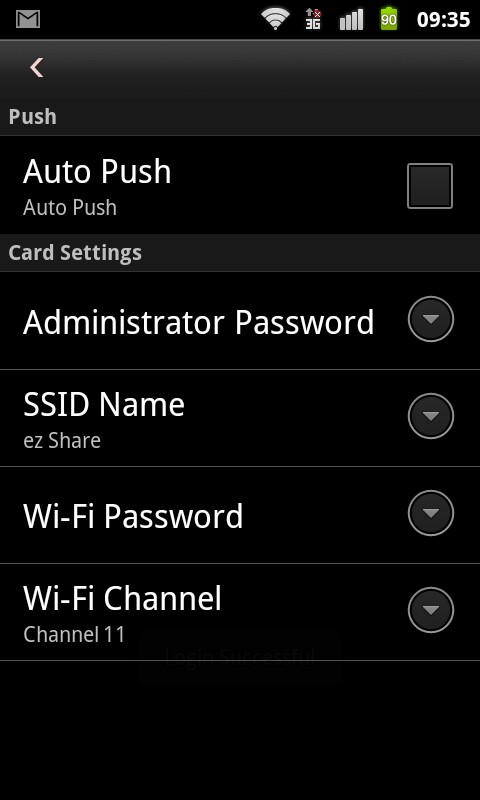
EZ Share Android app v.1.4.0 (also released while I was writing this review) is neat and simple. What Transcend Shoot and View  feature is also present and simply called Auto-Push. EZ Share just uses the "Share to" targets of the phone, so there's no real limitation.

Browser access is done simply by going to http://ez

The web interface offers a classic and a mobile view with same features than the EzShare app. CR2 files could be displayed once transfered to my phone. Unlike the Transcend which now deals with all kinds of file types, the ES100 is limited to video and picture files.


To reset the card to its defaults, the dummy file ezshare.cfg (it doesn't hold any actual settings) must be deleted from a PC. I found that trick less neat than the Transcend virtual picture which allows the same operation directly from the camera. The AP password will then revert to 88888888.


The Wi-Fi range (Indoor only tested) is conform to the 10m specified and 65Mbps max speed.


The average transfer rates are: Read: 15~19MB/s and Write: 10MB/s,... not great for Class 10 (for which 10MB/s is the absolute minimum). It was however good enough to shoot 1920x1080 videos @ 24fps.

While it also meets my expectations, the ES100 does not offer the same value for the price due to its lower SDHC performance and fewer features. The physical Wi-Fi switch remains its main selling point.
Links:
Product Page
User Guide

Pros: 
Physical switch for the Wi-Fi mode
Simple setup
RAW(incl.CR2)/JPEG/Video transfer.

Cons: 
Only acts as a Hot-spot,  no "Internet mode" (Router connection)
No "Wifi On" reminder (buzzer) on this version.
Write speed on the fringe for a Class 10

--------------------------------------------------------------

Cards tested with Canon EOS600D and Canon SX220HS.
While difficult to quantify, the use of Wi-Fi function has an obvious  impact on the battery, which is naturally more noticeable on the smaller SX220 than on the more powered EOS.

Similar products:
Trek FluCard Pro 16GB Class 6, ~70€
Eye-Fi Pro X2 16GB Class 10, ~100€
Toshiba Flash Air 8GB Class 10, ~50€ 
Read More

LG BD390 Blu-Ray player with Wi-Fi

LG BD390 Blu-Ray player with Wi-Fi
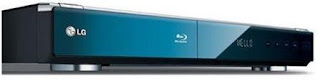
I was watching this Blu-Ray player for a few months and after having compared the features and prices with other Samsung and Sony players, it ended up as the logical choice. It took less thant a week to arrive from a German eBay shop that beats my usual providers (Amazon, Komplett, Pixmania) in terms of price and stock availability.

The installation was surprisingly easy and quick: after about 15 minutes, the unit was Network-connected, Region-hacked, and Firmware-updated ! Never mind the user manual was only in German (I downloaded the EN version from lge.com), it was really not necessary!


Network connection: My wireless router Billion Bipack 7402GXL was detected and I could even use its WPS (Wi-Fi protected Setup) function for the first time. In the Wireless setup, the LG BD390 offers a "Push Button" option, which starts a timer of 120 seconds during which I just need to press the WPS button on my router to have all the network information exchanged, saving me from entering manually the encryption type and key. That's all I needed to have the unit connected to the Internet. Repeating the operation later, I've found that it sometimes needs up to 3 retries to have the "Wireless Dynamic IP" setup successfully. Maybe a wireless range issue?

Region Hack: I downloaded the necessary file from multi-region.net and burned the RMTM0000 folder contained in the 6000.iso file.
Two things to consider regarding this hack:
- it is reported to work only on European models for some reason (to verify).
- it may not run if you already updated your firmware to the latest version.  LG Support Web Site keep a few versions back if needed.

The good thing is that the change is persistent, so upgrading the fw afterwards will not affect the hack.

Upon loading the CD containing the hack, a region selection appears where you just need to select the region you want with the up and down keys on the remote (0 for Region Free).

Firmware Update: the BD390 came with a the firmware version 8.08.360.B. I took the time before updating to look around the functions and browsing through the menu. I noticed it was sometimes sluggish, and occasionally even froze (trying to access a .TS file from the local network). If there was a Java console, I bet it would show an endless list of UnhandledExceptions scrolling. A 5 second push on the power button (like on most PC's) was necessary to force the unit to power off.
I had the firmware 8.08.529.B ready on a USB drive, but despite that, the player detected the update on the Internet and offered only this way to update. I found out after that, because I plugged in the USB drive before powering on, the DB390 didn't detect it at boot time. Un-plugging and re-plugging solved the problem.
The update operation took about 5 minutes and ended with the player powering off (not restarting). Upon powering it on again, I verified that the upgrade was in place and noticed that the operations were a bit smoother in general, and the unit generally more stable, even though some glitches are still present.

That's it, the player was set up, with a short review to adapt the display settings so it would work well with my almost-HD television (HD-Ready Samsung LE32R51B)


First use:

I won't give a full technical review, there are many good ones available already, but just my impressions during the first hour of use.

The HOME menu is called by pressing the Home button on the remote and offers 6 different sections:

Movie: that's were the local medias can be played: Movie/Audio disc or USB drive
I played a Divx movie from the USB drive and it loaded instantly, which differs greatly from the almost 2 minutes load time that my SilverCrest DVD reader from Lidl always needed, obviously to fill its buffer. Does it mean that the LG uses faster memory or... doesn't bufferize anything ?
Loading the Blu-Ray version of Ice Age 3 took between 20 seconds to 1 minutes depending...I don't know what! Loading DVD was always faster. I found the unit very silent, particularly after having recently seen a Samsung player in action.
 
Photo: will scan local medias for pictures

Music: will scan local medias for playable music.

My Media: That's the place I was looking forward to play with. All the uPNP/DLNA hosts show up here: it found my mobile phone Sony Ericsson G705,  Synology DS109 and computers (XP SP3 and Seven).
Re-scanning the network will never give twice the same result, so several attempts may be needed to get the full list.

Listing the media content can be randomly fast or sluggish even with the latest firmware.

The sluggishness of the unit is partially due to the remote and using a Logitech Harmony instead gives a much better response, but in addition, the system also sometimes stops responding for several seconds for no apparent reason.

The default view is not the best and pressing the Display button on the remote brings a more convenient "zoomed-out" view of the files list.
Inside My Media section, the content is again separated into three distinct kind of content: Movie, Photo and Music.

My Media > Movie: Wi-Fi 802.11n is especially welcome for playing video content, however my wireless router is still 802.11g.
This, combined to the occasional traffic from the Wii, the IP Cameras, and the weak signal caused by the distance from the router, resulted in occasional choppy Divx playback from my Synology NAS. This could be improved  by a proper buffering, but the LG BD390 doesn't seem to do any.

My Media > Photos: I found a bug in this part: the rendering of pictures from my NAS was awfull, as if a mosaic effect had been applied to them. Same from my phone. The same pictures read from a USB drive would show fine. (update: this turned out to be a Synology bug resolved from DSM 2.3-1143)


My Media > Music: the mp3's were played smoothly with no surprise. I just regret that it is such a basic music player, a shuffle function would have been nice.


YouTube: The YouTube browser.
Well, yes it plays videos from YouTube all right. I just don't see myself  spending evenings browsing YouTube videos on the telly, so I won't go there very often.


Setup: also speaks for itself.

In conclusion, some polishing is still needed to make this unit a fully satisfying player, but the potential is really there. Let's see if LG can make some difference here...


Pros:
- very simple to setup
- great set of features
- support many formats
- silent BD/DVD playback

Cons: (with fw 8.08.529.B)
- the player is randomly sluggish
- occasional crashes (not too often)

Cheapest (€223.-) found on eBay by  ITSS-DAMM.

Region hack: multi-region.net

Complete review: see audioholics.com

Support Web Site: www.lge.com
Read More

Raving Rabbit

Raving Rabbit

The little rural village where I live in Ireland has been blessed two years ago with the arrival of the 3G, and the national operator couldn't do anything against it this time (they're still making so much money with all the dial-up users!).
Some competition finally took off, and viable wireless solution became available in this Internet black spot.
So it's only in mid-2007 that I got an internet access with a usable bandwidth (and stop laughing, will you!).

This gave at last some justification to invest in a wireless router and wifi-enabled gadgets.

Thanks to that, I've been close to adopt a rabbit.

At that time, I read a lot of related articles and reviews and it appears that many customers are complaining about the randomly accessible server and the few services that actually work.
What holds me as well is certainly the price tag of the Nabaztag (€200).
The only potential competitor seems to be a wireless (not wi-fi) penguin (€150) built around the same idea, but more Linux developer than final-user friendly.

This product will certainly evolve and may become more attractive with time. So I keep it in my whish-list.

Known alternatives:

- Tux Droid penguin.

- Chumby.
- Your next TV ?
Read More

A small linux-based wireless storage

A small linux-based wireless storage
Linux-based Wireless storage
I must confess that I bought this item by mistake: I expected this tiny wireless storage to be the perfect companion for my DVR (Digital Video Recorder). But I neglected to ensure that it would have a USB Host type of port, and it's not the case. So it cannot act as a flash drive for the DVR, if you follow me.

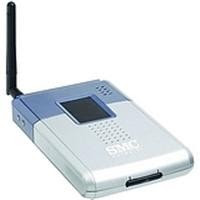
Still, it's a nice device: small enough, using a 6.3cm (2.5") hard drive, and running on a mini linux OS (telnet access to it can be enabled). Mine came as a SMC WAPS-G flashed with the latest WMU-6000FS firmware from Ovislink. This brand offers a convenient download manager (BitTorrent, HTTP and FTP) as part of its embedded software and while it's not exempt from bugs and typos, it does the job quite nicely, sending you an email when the download is done. Last seen just below €50.- (without the hard drive).

The site macsat.com and its wiki are the places for push the limits further with custom firmwares. However, you should decide if you really need those additional features and make yourself familiar with the recovery techniques (jtag) beforehand as it seems quite common to end up turning that wi-fi storage into a useless brick.

Pros:
+ affordable storage solution
+ mini Linux kernel on board
+ highly tweakable
(source codes are available from some manufacturers)

Cons:
- Official development abandoned (latest fw dated 2007/12/07)
- Disputable reliability
- Some bugs


See also:
Hacking MGB100

Other known clones:
Level-One (WAP-0007), Comet Labs (MGB100), Conceptronic (CHD2WLANU), Micronica (MGB100), Safecom (SWSAPUR-5400), Pearl (PE6643)
Read More

Foscam Wireless Pan & Tilt IP Camera

Foscam Wireless Pan & Tilt IP Camera


I've been searching for a wireless camera solution to second my troublesome and unreliable X10-based alarm system. This dial-up central is very sensible to interferences and so always called me following a false alarm. Having a way to confirm visually an intrusion would be a good thing for the day this alarm would really go off for a good reason.


I already tried a solution made of a RF-based DVR (the kind using an SD card to store the pictures taken) and some cheap cameras, but the picture quality was far too bad, partly due to the poor signal range. And if was ever to take evidences of an intrusion, I would have seen it days later, when back from holidays... what's the point then ?

In comparison, the IP camera should be able to alert me by email when the intrusion occurs, and give me the option to access it remotely to get further evidences, and call the police the same day.

I found what seems to be the cheapest Pan & Tilt IP camera with Wi-Fi capability on eBay (around 85€).

The device comes unbranded and contains no model reference, however, after some googling, it seems to match with the IP camera model FI8908W from Foscam.

The manual is correct but could be more complete. For instance, the led blinking rate meaning, which I figured out eventually:
Led blinking Slowly: the camera is searching for an access point.
Led blinking Fast: the camera is connected to a LAN by the Ethernet
Led blinking Faster: the camera connected to a wireless access point. This is only possible when the Ethernet cable is unplugged.
The blinking rate should change within the first minute after turning on the camera. If it keeps blinking slowly for longer, you know there is a problem.

The setup is fairly easy once you authorize IE to download unsigned ActiveX controls for your security zone, and also make sure that your anti-virus does not silently block the traffic, which was the case for me with Avast Antivirus. I had to set the camera address in the exception field of its network shield.

To my surprise, the technical support from Foscam replied quickly and was friendly and helpful.
The current firmware version (11.14.1.34) does not seem to implement the UPnP properly. When activated, it consistently returns "UPnP Failed: Errors in Chat with UPnP Device".
According to Foscam, it does not work well at the moment and would be looked after in a future firmware.

Beside that minor detail, the camera is easy to use with a decent user interface. I would however regret that the camera control is using ActiveX . So this product is primarily for M$-Windows users (Apparently there is a working software alternative for Linux called ZoneMinder but I didn't test it yet.) .
There is a misleading mention of Firefox support on the box, but it's done through an add-on called IE tab which basically loads a IE page in a Firefox tab...Mmm

The motion detection can be programmed for different times during the week and pictures can be sent automatically to an FTP server and/or and email address at a predefined interval. It is also possible to interface the camera with an external PIR sensor or alarm system through its RS485 connector.

This green connector on the camera has 4 pins (shortly described in page 19 of the manual).

- Pins 1 & 2 are for output: typically these would go to the wired inputs of an alarm central like the SC28 or SC9100. If the camera meets an alarm condition (movement) it would send the signal to the central like a DS10/18 (Door sensor) or MS10/18 (PIR) would. There's also a button on the Web UI that allows to activate pin1 manually.

- Pins 3 & 4 are for input:
You would use these to link wires from a Sensor (DS10/18 have connectors available for that) or any PIR, so if they detect a movement, the camera would, I guess, upload pictures, send an email (as set in camera's Alarm Service Settings) and output +5V on pin 1.


Dynamic DNS can be used for setting up a access from the Internet. It is then possible to log into the camera server and record a video if necessary.

Thanks to the IR leds surrounding the camera lense, the image quality at night is simply as good if not better than during the day.

There is a two-way audio monitoring support on this camera, which means that you can listen from it, and that part is okay, but you could also speak into your PC microphone and a speaker embedded in the camera will relay the sound. The very bad sound quality in this case will make that feature useless.

As a final word, this IP camera is a much better investment that the traditional RF-based cameras. The picture is of better quality despite the similar CMOS sensor and the added value to your home security system will quickly become obvious.

Pros:
+ Good set of features
+ Good image quality day and night
+ Responsive technical support

Cons:
- ActiveX control only (see the latest update about this)
- UPnP not properly implemented
- Poor embedded speaker quality

Update #1: I recently purchased a second camera and picked a white version. The brackets enclosing the camera tend to be loose. As a result the motor doesn't always have enough grip to move the camera vertically. I think it comes from the thin plastic casing which seems to be of a lower quality than the black version.


Update #2: After returning the defective white IP camera, I received another white one, obviously from a more recent batch, the plastic casing is less glossy and of comparable quality to the black model. There is also a small addition at the back of the camera: a mini jack connector for external audio. Since the embedded speaker is not great, you can now plug a better one in there.


Useful document: original IP camera manual (a bit outdated)
.
Read More

FAQ for IP Cameras

FAQ for IP Cameras
Below is a compilation of the frequently asked questions on IP cameras subjects found on this site.
While they initially apply to the model fi8908w from Foscam, they are susceptible to be of interest for other models and brands.


This FAQ is complementing the troubleshooting section present in some manuals, like IPCAM user guide 4.1.2 - mirror

-1-
Q. I can't access to my camera wirelessly!
A. A common mistake is to setup an arbitrary SSID in the wireless settings and expect to connect to the camera from a PC with wifi dongle just by looking for that SSID. In fact, the camera needs to connect to a wireless router to be usable wirelessly, so this SSID field in the camera settings must match the routers SSID. You must enter the appropriate parameters to allow your camera to connect to the router.
A #2. Foscam models usually don't deal well with long/complex  (with symbols or accents) SSID's and shared keys, so keep them simple and short, unless you have a FI8918W with a firmware 11.22.2.36 or above.


-2-
Q. No Image: The camera's web page opens but only the controls are displayed and the camera view remains black. Sometimes a message "Disconnected by user" appears.
A.1. This commonly occurs with this kind of AX controls. By default, Internet Explorer security settings prevents unsigned ActiveX controls from being used. You need to enable the option "Download unsigned ActiveX controls" under the security properties of IE. For increased security, add the camera url in the Trusted Sites and change this security parameter only for this zone.


A.2. Another common cause is the Anti-Virus blocking your ActiveX control as well (In my experience Avast would do that without any notification). You need to enter the camera IP address in the appropriate exception field of your anti-virus settings. If it's safe to do so, consider specifying the whole subnet as an exception, so the problem won't come back next time your camera IP address changes.


-3-
Q. Email Alert settings: I can't get the camera to send the emails alerts to my Gmail inbox. Why?
(Getting error: Test  ...  Failed Can not connect to the server)

A. Gmail requires encryption for its default SMTP server. This is is often not supported by ip cameras. So the solution is to use a non-SSL SMTP server. Many ISP's provide such free SMTP service with no authentication required and that can be used to fill the "SMTP server" field. you can also try this free non-encrypted SMTP address provided by Gmail: gmail-smtp-in.l.google.com
Gmail sender and receiver addresses are independent from the SMTP server used.
FI8918W only: TLS support has been added in fw 11.22.2.36.

-4-

Q. How to prevent the camera from looking at the ceiling after a reboot?
A. The default behavior of a PTZ camera such as fi8908w is to perform an initial rotation when starting. At the end of the boot up test, it returns to a center position that is slightly pointing upward.
In the case of an unexpected reboot, after a power failure for instance, the area that you assumed to be covered by the motion detection will actually no be watched anymore.
To overcome this, you can use the following command so the camera will not move during the reboot phase:
http://IPCamURL/set_misc.cgi?ptz_center_onstart=0

Update: since firmware 11.14.2.17/WebUI 2.4.8.14, it is possible to set this from the user interface, by clearing the box next to "Go center on boot" in the PTZ Settings section.

-5-
Q. Is it possible to turn off the green led?
A. Yes, it is possible for FI8908W since firmware 11.14.1.43. An option to disable the activity led has been added under the Basic Network settings section.


-6-
Q. What does the activity led blinking rates means?

A. There are 3 blinking rates:
Slow blinking: is seen during the boot sequence, while the camera is searching for an network.


Fast blinking: indicates that the camera is connected through the Ethernet port


Faster blinking: indicates that the camera is connected through Wi-Fi.


The steady green led (no blinking) is something you hope to never see. Check next article.


-7-
Q. Is my ip camera really bricked?
A.The first sign of a bricked FI8908W camera is that it does not perform it's initial rotation at start anymore (unless this was disabled by article #4 above!). Also, if the activity led is lit without blinking. Make sure that the IP Camera tool can't find it anymore whe connected directly to the Ethernet port.
It may have taken a new IP address: On the router, remove its old DHCP fixed address if any, turn off the MAC filtering and see it there is any incoming DHCP request.
In most cases, the camera that got bricked was not a compatible Foscam device. Check posts about Foscam on this blog for indications of a fake or non-compatible camera (sometimes difficult to distinguish).
Best way to brick a camera is to flash it over the Wi-Fi connection. It is highly recommended to always flash the camera through the Ethernet port.
In some cases the camera can be recovered by a last chance operation explained here.

-8-
Q. How to send the camera videostream to VLC player?

A. In Media menu, go to Open Network Stream, then put the following url in the address field:
http://ipcam-url:port/videostream.asf?user=username&pwd=password
If the user and password are not specified in the url, they will just be prompted during the connection.
Note: videostream.cgi can be used instead of videostream.asf but it will only stream video (no sound)

Usage:
/videostream.cgi[?user=&pwd=&resolution=&rate=]
/videostream.asf[?user=&pwd=&resolution=&rate=]

Parameters:
  resolution:(8:320*240,32:640*480)
  rate: 0-23
    0:maximum
    1:20 fps
    3:15 fps
    6:10 fps
    11:5 fps
    12:4 fps
    13:3 fps
    14:2 fps
    15:1 fps
    17:1 fp/2s
    19:1 fp/3s
    21:1 fp/4s
    23:1 fp/5s

Typical url in Firefox or Chrome would look like this:
http://user:password/ipcam-url/videostream.asf?resolution=32&rate=15

Typical VLC command line:
vlc -vvv http:/user:password/ipcam-url/videostream.asf?resolution=32&rate=15 

-9-
Q. Internet Explorer 7/8 crashes upon loading the IP Camera interface.
A. This can be caused by the IE8 Data Execution Prevention (DEP). The workaround is to clear the option Tools > Internet Options > Advanced > “Enable memory protection to help mitigate online attacks" in IE settings (Administrator account is required).


-10-
Q. Additional cameras defined are not accessible from the Internet
A. If you intend to access the camera defined in Multi-device settings from the Internet, you need to enter their external url and port that you would use to connect to them individually from the Internet.


-11-
Q. How to factory-reset my IP Cam?
A. Start with the camera powered off.
Keep the reset button pressed while re-plugging the power cable. Keep the reset button pressed for up to 20 seconds. On a PTZ camera, you know that you can release the reset button when it starts moving and the network indicator starts to blink.
The Foscam camera should now be back to factory default with user "admin" and no password. Since the IP address is reset as well, it may not appear on the network. Use the IP Camera tool to access it.


-12-
Q. No Picture attached in the Email sent by the Alarm function
A. Check the camera Alias under Device Settings. It should be kept short and simple and have no special characters. (Thanks to Matt and Fabrizio)


-13-
Q. No or interrupted Wi-Fi connection 
A. A popular cause is the WPA key that is too long. Keep things simple, define a shorter key. In some other cases the internal wiring to the antenna of the IP Camera is faulty and might need to be soldered properly. If you get a consistent connection only when the camera is sitting just beside the router, then this last point might be the problem.
.
Read More