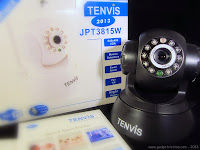
According to Tenvis, the JPT3815W was their best seller in 2012 despite of the emergence of IR-cut and HD models.
So they decided to give the 2013 edition a little refresh.
This device keeps the shape that became so popular since
my first IP Cameras purchased back in 2009, with the lens ball recalling the Princess Leia's hair cut.
My 2 old units are still in service, despite a hard life in my hands as Guinea pigs, with a permanent TTL connection soldered to them...
Some quick highlights of the Tenvis JPT3815 "2013 edition": MJPEG 640x480, w/o IR Cut
Not to be mistaken with JPT3815W+ (5db antenna and IR-Cut)
Wifi 802.11b/g and Ethernet 10/100
Embedded microphone and speaker for 2-way audio
Audio out connector
No alarm I/O connector
My Tenvis unit came with the firmware 1.7.10. That version was unstable and I upgraded to the newly released
1.7.15 during my tests, which gave
some relief.
Tenvis warned that the 2013 edition's firmware, which now comes as a unique 3.6MB .bin file, is not backward compatible.


The IP Camera Wizard software is aimed at making the network setup as easy as possible. The program will detect the camera for you and help configuring it in a few steps.
In addition, the
Quick Start Guide gives a clear overview of the installation steps: Wired network setup, first access to the camera from a browser, IE plugin installation (IPCPlayerIEplug.ocx installer comes embedded in the camera), wireless LAN setup,...
The wizard will even assist in setting up the Internet access with your predefined built-in DDNS id (xxxx.tenvis.info). On the first day of test, there was no way to register to Tenvis DDNS, and I see similar complaints on their forum. The next day, it suddenly worked. Hopefully it will eventually become more stable as their server has recently been upgraded. Something to keep an eye on...

The following third party DDNS are also possible:
dyndns.org,
freedns.afraid.org,
www.zoneedit.com,
www.no-ip.com, and
ddns.oray.com.
All these efforts in assisting the beginner with setting up the IP Camera are good points to be credited to Tenvis.
If you're more experimented, checking the predefined IP address and port labelled on the camera base should get you started quickly as well .
The first screen loaded upon connecting is a welcome page with various access options, the first one being the detected browser. The IE ActiveX plugin can be installed from there. The interface is localized in several languages...

I've tried the French interface and while the automated translation is usable -I've seen much worse recently- it could use some human touch...
The menu layout remains clear, with another particularity of Tenvis: they show their Customer Service contact details on the system information page. Rare enough to be noted!
During my tests, with the interface set to English, I sometimes got Chinese text appearing. Most of the time it self-refreshes to the English version. Sometimes also the page would need a refresh to show the picture.
However, these problems were seen under Windows 8, IE 10, Chrome, Firefox, and I didn't appear for the shortest time I used an XP workstation.
Leaving the iPad-style consideration aside, the general look and feel of the refreshed JPT3815W interface is clean and intuitive. The Mozilla interface has no option for 2-way sound, no movie recording, and no multi-view, and perhaps adding a VLC view to the Welcome Screen (the iPad button on the left brings you back to it) would be a nice addition in the future.


The picture quality is what you can expect from any 300k px IP camera. Strangely I found no option to set the video mode (50Hz, 60Hz, outdoor) in the interface, and the command
/get_camera_params.cgi suggests that it's locked in mode 0 i.e. 50Hz
In addition to the various viewing ways already provided by the Welcome Page, the video stream of the JPT3815W-2013 can still be used as before with the SmartPhone app
Hit-Mob's IP Camera Viewer. Strangely, in
Synology Surveillance Station, while I could preview the camera as a
Foscam FI8908W, it was impossible to enable it afterwards. I had to use the good old generic url
.../videostream.cgi.

While I was playing with the
CGI command set, I noticed that some of them would not work. This includes the
get_misc.cgi and
set_misc.cgi. This later is generally very convenient to activate options that are not (yet) in available the user interface.
As an example set_misc.cgi?led_mode=2 would normally turns off the front LED, but not anymore!
Furthermore, the missing video mode option in the GUI could normally be changed by issuing /camera_control.cgi?mode=2, but while I receive the "ok" from the camera, nothing changes.

This partial support of the SDK is definitely something I'll run through the Tenvis support.
Conclusion:These affordable little workhorses are a good option for building a start-up surveillance kit on a restricted budget (priced around 50€, shipping included)
To be distinguished from the crowd, the JPT3815W from Tenvis has provided a well thought Setup Wizard, a modern user interface and its own free DDNS service.
The reworked interface is missing some basic features (e.g. LED control, video mode), and an updated SDK documentation is badly needed.
Pros
- Clear printed Startup Guide in proper English.
- Well thought Setup Wizard program, making the network installation a breeze
- Interface localized in 9 languages (needs ironing but usable)
- Embedded ActiveX plugin setup file
- Tenvis DDNS service
Cons
- Partial support of the current SDK
- no option to disable the front LED
- page comes back sometimes partially or fully in Chinese (seen on Windows 8)
To know more:Product PageTenvis Forum