Showing posts with label Synology. Show all posts

Cheapest DVB-T add-on for Synology Diskstation

Cheapest DVB-T add-on for Synology Diskstation
Synology has a list of User Reported Compatible DVB-T Sticks, most of them ranging from 10 to 100€.

There're even cheaper devices perfectly fit for the job, such as this little gizmo...


Since most of the software functions, including the scheduled recording are provided by Video Station, there's no need to invest into a high end tuner bundled with expensive OEM software and extra features like an SD card reader.


I found the WL4D on ebay to be one of the cheapest USB dongle for DVB-T. Although it's not in any Synology list, for 6€, the risk was acceptable.

This little tuner comes in 3 formats which mainly differ by their antenna connector and dongle size.
They all come with a magnetic antenna, a remote controller,  and a CD containing the Windows drivers and BlazeDTV 6.0.

It must be noted that only the European DVB-T standard is supported and it's not intended to work in US, Canada, Japan and Singapore.

With this inexpensive gadget plugged in a USB port at the back of the Synology Diskstation (DS213+ in my case), the Video Station station DTV feature can be enabled.

After selecting the correct country and region, a rather long scanning process will detect all the available digital TV and radio channels.


Once the streaming is activated, it can be accessed by any capable device on the LAN.

Video Station provides the EPG and direct or scheduled recording.

VLC plugin is used for viewing the streaming and channels can be changed directly from there.


TV can be also watched and recordings scheduled from a phone or tablet using the DS Video app.  

Channel selection list from DS Video
Read More

Connecting IP Camera Viewer to Synology Surveillance Station

Connecting IP Camera Viewer to Synology Surveillance Station
HitMob's IP Camera Viewer for Android and iOS can be configured to access the IP Cameras through Synology Surveillance Station, with the distinctive advantage that such connection can be encrypted.

The process is not over-complicated but deserves to be properly documented.


While IP Cameras claim to be security devices, most of them are completely insecure when it comes to access them: their clear text login is easy to intercept. Only high-end models support SSL encryption,

This is the reason I recently invested into 5 additional Synology camera licenses (CLP4 + CLP1, which means an extra 200€ in total!!

The Smartphone app DS Cam from Synology is far from perfect and only supports MJPEG cameras under a unique multi-view.
HitMob's IP Camera Viewer supports Synology but does not give much information on how to make this work.

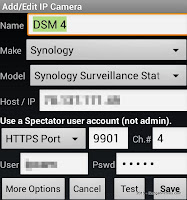
The very first requirement, at least since DSM 4.x, is to have a non-admin user with nothing else than the Surveillance Station permission.
If the user presented by IP Camera Viewer has any sort of administrator privilege, it will be rejected by the NAS.


The next thing is to confirm an HTTPS port for the Surveillance Station via the Syno's Application Portal (here 9901) and to ensure that the router will forward external requests to that port (9901) to the NAS internal IP address.
click for bigger view


From there it is just a matter of creating cameras in IP Camera Viewer, using Synology as Make and Synology Surveillance Station as Model, with the right DDNS address, HTTPS port, and login. You must create one entry per camera. Each camera is identified by the field Ch.#
To speed things up, the first camera can be cloned via the application menu and the channel field (Ch.#) will be automatically incremented for each new clone.


Gaining in security requires a trade with functionalities, and you may loose the PTZ control and Audio. At least that's my case with Foscam FI8918W, Tenvis JPT3815W, Tenvis IPRobot3 and Dericam H502W.


See also: Security and IP Cameras
Read More