The D201 is the first car camera equipped with the Ambarella A12 chipset with a 5MP sensor (OV4689) allowing a video resolution up to 1440P (2560x1440@30fps).

Ambarella A12 pushes the resolution limit to 1440P (A7 chipset was 1296P)

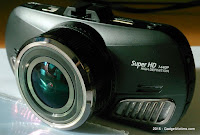
The unit is bigger than its predecessors (G90/G98S). Despite the size and the chrome vents (They're supposed to remind the grille of some cars.) the camera remains reasonably discrete.

The D201 is also produced in gold color. Gearbest made the wise decision to sell the black version.
The tiny 190mAh battery can keep the camera powered for about 15 minutes, comparable to the GS98C. This gives enough autonomy to take some pictures outside the car.
 The power button located on the top right side doubles conveniently as camera button...well done Dome!
The suction mount is basic and not the easiest to fit the camera on.
For the price (139$/124€ @ Gearbest with the GPS unit.), Dome could have included a better base where power and GPS would be connected permanently.
User Interface:
 The buttons are clearly labelled and positioned on the left and right edges of the camera. This is ok except for the only button, "SOS", that won't be easy to reach while driving. There is a bigger chance to accidentally rotate the camera than with a button on the back side (as with G90) where you just need to "pinch" the camera.
The setting options are limited to the strict minimum:
There's (again) no option to get rid of the permanent speed indicator, it is also restricted to km/h, there's no picture tuning (EV, white balance, metering...) and no ADAS calibration.

GPS: The GPS module works as expected and, if well positioned, takes about a minute to lock. It's not the fastest (within 15" for Ausdom A261) and not the slowest (~4 mins for CDV300X).
Video player...

For once, the Registrator Viewer is not the best choice because it does not recognize the GPS track format unfortunately.
This is just an omission in the File Type selector. The trick is to type * in the File Name field to display the MP4 files.
Once loaded, the video can be played with most GPS track information.

Video and audio
The sharpness improvement brought by the 1440P resolution is visible when looking at the details, like registrations of cars passing by. In the example below (a foggy November morning), I'm driving at 77 km/h and the Ford is approaching at about the same speed. Here you can more than guess the "5454" which would be too blurred to read in any lower resolution.
It is worth mentioning that the audio is excellent and clean from any interference.
Beside the optional stamps for Car ID, Date and Time, the Speed Stamp is there too.
The 2.7" LCD screen is really just good enough to configure the device. The low screen resolution and lack of pause or volume function makes it inconvenient for video playback.


Conclusion:
The D201 is a fine container to show off the new Ambarella A12 chipset with 1440P videos.
The increase in resolution makes a difference when it comes to review the details in a recording.
The overall product design is good and the software is ok although more options would have been nice.
Like GS98C, the D201 offers a clean sound quality and an adequate battery strength, two of Dome biggest problems in the past.
The initial price tag (139$/124€ by Gearbest) is a big high, more than twice the cost of the 1296P-capable GS98C (also with GPS).
The coupon "D201", however, brings the price down to a more reasonable $105.99/99€
Also, the D201 will be available for a limited time at 95.99$/90€ during Gearbest 11/11 promotion.
Pro:
- Sharp and smooth 1440P videos
- Clear and loud audio recording
- Battery, once charged, would power the camera for about 10 minutes
- All sounds including jingles can be muted
- Video Player reads the mp4 files once you know how to load them.
Cons:
- Permanent speed stamp on screen, once again, including on still pictures.
- Slightly bulkier than its predecessors
- Limited configuration options


Read More


Ambarella A12 pushes the resolution limit to 1440P (A7 chipset was 1296P)

The unit is bigger than its predecessors (G90/G98S). Despite the size and the chrome vents (They're supposed to remind the grille of some cars.) the camera remains reasonably discrete.

The D201 is also produced in gold color. Gearbest made the wise decision to sell the black version.
The tiny 190mAh battery can keep the camera powered for about 15 minutes, comparable to the GS98C. This gives enough autonomy to take some pictures outside the car.
 The power button located on the top right side doubles conveniently as camera button...well done Dome!
The suction mount is basic and not the easiest to fit the camera on.
For the price (139$/124€ @ Gearbest with the GPS unit.), Dome could have included a better base where power and GPS would be connected permanently.
User Interface:
The buttons are clearly labelled and positioned on the left and right edges of the camera. This is ok except for the only button, "SOS", that won't be easy to reach while driving. There is a bigger chance to accidentally rotate the camera than with a button on the back side (as with G90) where you just need to "pinch" the camera. The setting options are limited to the strict minimum:
There's (again) no option to get rid of the permanent speed indicator, it is also restricted to km/h, there's no picture tuning (EV, white balance, metering...) and no ADAS calibration.
 |
| The G90 and its "easy to pinch" SOS button |

GPS: The GPS module works as expected and, if well positioned, takes about a minute to lock. It's not the fastest (within 15" for Ausdom A261) and not the slowest (~4 mins for CDV300X).
Video player...

For once, the Registrator Viewer is not the best choice because it does not recognize the GPS track format unfortunately.
The internal storage of the camera contains a video player (Player_installer_v1.114.exe)
At first, it looks like it only reads mov files (and this camera produces mp4's).This is just an omission in the File Type selector. The trick is to type * in the File Name field to display the MP4 files.
Once loaded, the video can be played with most GPS track information.

Video and audio
The sharpness improvement brought by the 1440P resolution is visible when looking at the details, like registrations of cars passing by. In the example below (a foggy November morning), I'm driving at 77 km/h and the Ford is approaching at about the same speed. Here you can more than guess the "5454" which would be too blurred to read in any lower resolution.
 |
| The permanent speed stamp: more than a bug! A Dome tradition! |
Beside the optional stamps for Car ID, Date and Time, the Speed Stamp is there too.


Conclusion:
The D201 is a fine container to show off the new Ambarella A12 chipset with 1440P videos.
 |
| D201 and GS98C |
The overall product design is good and the software is ok although more options would have been nice.
Like GS98C, the D201 offers a clean sound quality and an adequate battery strength, two of Dome biggest problems in the past.
The initial price tag (139$/124€ by Gearbest) is a big high, more than twice the cost of the 1296P-capable GS98C (also with GPS).
The coupon "D201", however, brings the price down to a more reasonable $105.99/99€
Also, the D201 will be available for a limited time at 95.99$/90€ during Gearbest 11/11 promotion.
Pro:
- Sharp and smooth 1440P videos
- Clear and loud audio recording
- Battery, once charged, would power the camera for about 10 minutes
- All sounds including jingles can be muted
- Video Player reads the mp4 files once you know how to load them.
Cons:
- Permanent speed stamp on screen, once again, including on still pictures.
- Slightly bulkier than its predecessors
- Limited configuration options

Special thanks to Lindell @ GearBest for providing this sample.