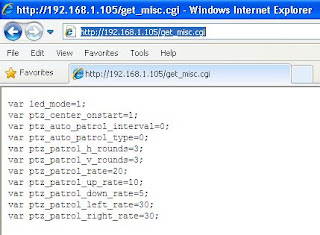
The following is a selection of CGI functions that can be used with Foscam ip cameras. They are issued through the URL line of a browser and can be used as convenient shortcuts to features that are not ideally accessible in the original UI, like the network activity led, which is located on a page that requires a reboot while the function itself could be activated instantly.
http://[ipcam]/set_misc.cgi?led_mode=2this will turn off the green activity led instantly.
The valid values are as follow:
led_mode=0 - the green led blinks only once connected.
led_mode=1 - the green led blinks while searching for a connection and when connected.
led_mode=2 - the green led is always off.
See
here for the meaning of the different blinking rates.
http://[ipcam]/set_misc.cgi?ptz_center_onstart=0the camera won't auto-rotate any more when restarting, so you won't need to re-position it any longer upon rebooting.
http://[ipcam]/set_misc.cgi?ptz_auto_patrol_interval=30This function is currently not implemented in the user interface and instructs the camera to start a patrol at a defined interval, here
30 seconds.
The patrol type is defined by this other command:
http://[ipcam]/set_misc.cgi?ptz_auto_patrol_type=1Possible values: 0: None; 1: horizontal; 2: vertical; 3: Horizontal + Vertical
http://[ipcam]/set_misc.cgi?ptz_patrol_rate=
20The value provided will defined how fast the camera will rotate on patrol, here 20 is the default.
Fastest speed = 0. Slowest speed = 100.
http://[ipcam]/get_misc.cgi Returns all the current values for the functions above.
http://[ipcam]/get_log.cgiDisplays the visits log
http://[ipcam]/get_params.cgiReturns the complete configuration of the camera.
All the commands can be chained in the same url by using & as separator.
(complete documentation can be found on this page)
Read More
 The THL W100 phone does not have any notification LED for missed phone calls and text messages.
 The first one, will hack the power LED for notifications...